Blog · Step-by-step guide
How to automate job applications for free, step by step
To automate job applications for free, use free AI agents that do the repetitive work and leave the decisions to you. They search for jobs, tailor your resume and fill each application form for you to check. With Hirabo you open the web app, upload your resume and go. You answer what only you can, and press Submit.
Before you start
What you need
Not much. That is the point.
- A computer with a modern web browser.
- Your resume as a PDF, Word file or text.
- No account, nothing to install and nothing to pay.
Open the Hirabo app to start.
The walkthrough
Run your search in five steps
The app walks you through five steps. It does the work at each one, and you check the result.
Resume
Upload a PDF, Word file or text, or paste it in. Your contact details and links are pulled out for you to check once. Add your work authorization, sponsorship and other common answers there too, so you never type them again.
Jobs
Search by job title, or leave it empty and one is suggested from your resume. Results come from many sources at once, including Greenhouse, Lever and Ashby boards. Each job gets a match score with the reasons behind it. Set a location, or a “Remote from” filter such as “Canada, US”. Save the jobs you like, or paste one you found.
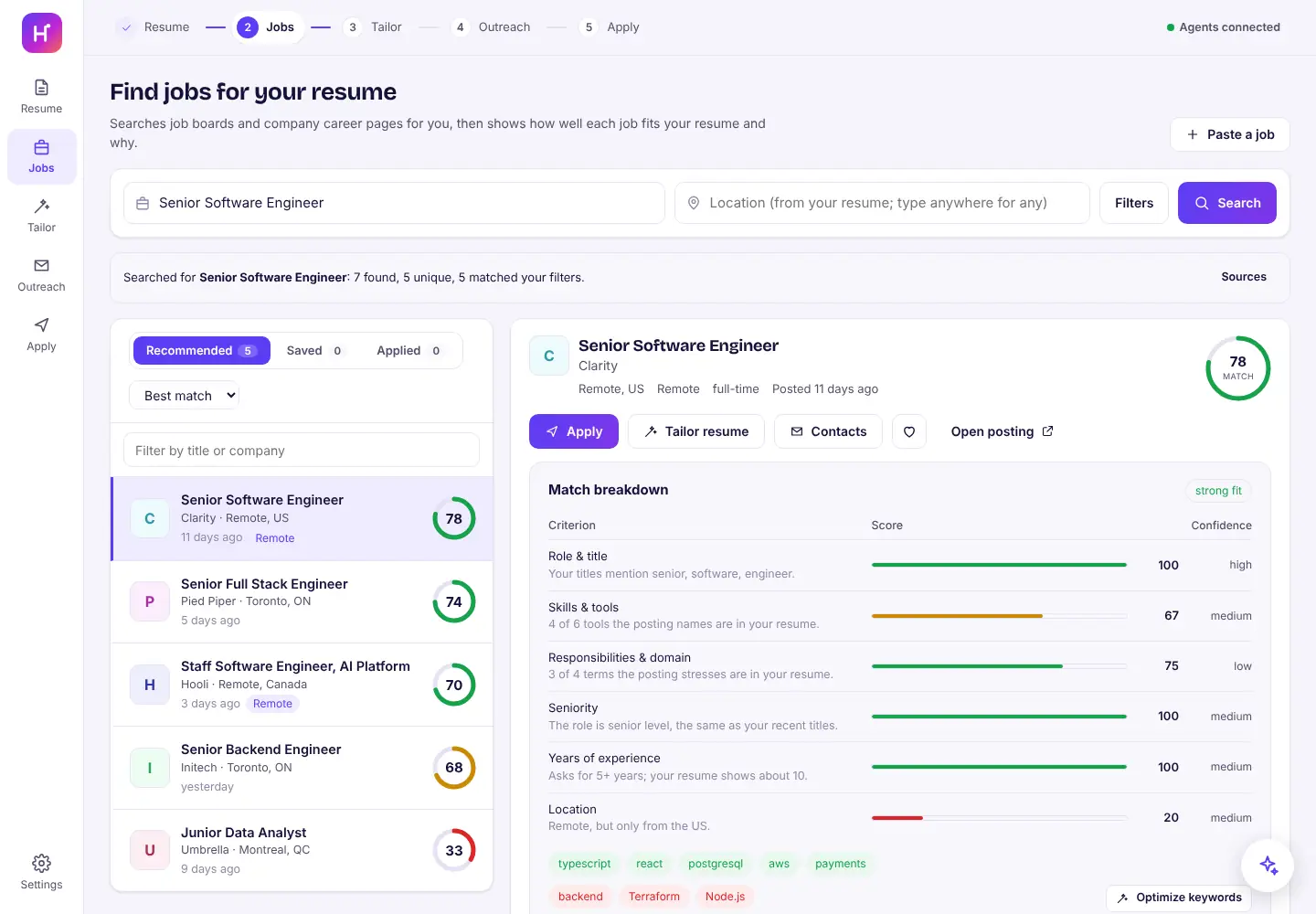
Jobs ranked by how well they fit, with the reasons for the top match. Tailor
Get a version of your resume for one job, with every change shown next to your original wording. The keyword optimizer lists the job's terms your resume is missing. Tick only the ones that are true for you.
Outreach
Hirabo finds the recruiter and hiring manager from public pages and drafts a short email to each. Nothing is sent; you send them yourself.
Apply
Get a cover letter written from your resume. Then let Hirabo fill the application, with a screenshot, every filled answer and the questions left for you. Nothing is sent yet.

One form at a time
How to automate job applications for free, one form at a time
Here is what the Apply step looks like in practice.
Fill it
Press “Open and fill the application”. Nothing is sent.
Check the drafts
Read the answers it wrote for you. Keep or edit each one.
Answer the rest
Answer the questions left for you, then press “Fill again with my answers”.
Submit
When every required question is answered, press Submit and confirm.

Then one of three things happens:
- The site confirms it, and the app shows you the confirmation.
- A CAPTCHA, sign-in or bot check gets in the way. Some Greenhouse and Lever boards add a hidden CAPTCHA when you send, and Workday usually needs an account. Press “Apply myself” and paste the filled answers.
- It was sent but the site didn't confirm it. Check your email before applying again.
Every application comes with a screenshot of the filled form. Press “Mark as applied” when you send one yourself. The platform guides cover each system: Greenhouse, Lever, Ashby and Workday.
The catch
What free costs you
No money, but some of your time. You still read and submit every application yourself, which is the point: nothing goes out under your name unseen. The forms it fills best are Greenhouse, Lever and Ashby, and some other sites need you to finish by hand. See how it works for the full picture, or go back to the free AI job search agent overview.
Keep reading
Related reading
FAQ
Frequently asked questions
Do I need to install anything?
No. It is a web app, so it runs in your browser. There is no account to create and no credit card.
Is there a limit on how many applications I can fill?
Each application is filled one at a time and sent only when you press Submit. The tool is built for one person's search, not bulk applying.
Where are my jobs and applications saved?
Jobs, resumes, drafts and answers are saved in your own browser. Hirabo also keeps a screenshot and a record of each application it fills, on its servers, so you can check what was entered.
Your next job search starts here
Upload your resume and see your best-matched jobs in minutes. Hirabo is free, with no credit card.